


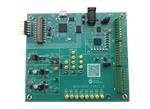
MAX22005EVKIT Evaluation Kit
Analog Devices MAX22005EVKIT Evaluation Kit provides a demonstration platform for the MAX22005A 12-Channel Analog Input. The MAX22005A is an industrial-grade analog input voltage-mode device that can also be configured as an analog input current-mode device using an external precision resistor per channel. The MAX22005A can also operate as a configurable analog input using an external precision resistor and low-cost switch per channel. Input channels can be used as 12 single-ended inputs, six differential inputs, or up to eight multichannel configurable differential inputs. In total, the device supports up to 26 configurations. Analog Devices MAX22005EVKIT Evaluation Kit features a pre-installed MAX22005 in an LGA-48 package. The kit can be connected to a Windows-based PC using a USB cable. A Graphic User Interface (GUI) enables the user to configure the target device easily.
Aşağıdaki arama teriminizi değiştirmeyi deneyin veya Yardım Merkezi'mizi ziyaret edin.
Arama Önerileri
- Parça numarasının veya anahtar kelimelerin yazımını kontrol edin
- Daha az veya farklı anahtar kelimeler kullanın
- Tek seferde 1 parça numarasında arama yapın
- Tek seferde 1 filtre uygulayın