




Analog Devices Inc. EVAL-CN0575-RPIZ Development Board
Analog Devices Inc. EVAL-CN0575-RPIZ Development Board is a 4-layer printed circuit board (PCB) for evaluating the CN0575. The CN0575 is a 10BASE-T1L Field Device Development Platform with Class 12/13 Single Pair Power over Ethernet (SPoE). The Analog Devices Inc. EVAL-CN0575-RPIZ is designed for the Raspberry Pi platform and offers seamless integration with its 40-pin GPIO header. The device maintains the mechanical dimensions of a standard HAT. To facilitate board stacking and the development of field device applications using Raspberry Pi HATs, the evaluation board comes equipped with an additional GPIO header featuring extended leads.
Features
- Data and power delivery using single-pair Power over Ethernet
- Power Class 12 and 13 delivery capable
- Supports longer distances of up to 1km
- Provides speeds up to 10MBPS
- Works with existing software stacks like PROFINET, EtherCat, MOD-BUS, and others
Applications
- Temperature sensing field device
- Field device development
- Power over Ethernet (PoE) applications
- Raspberry Pi HAT development
- Remote user input/output
- Educational projects
- IoT applications
- Industrial automation
- Home automation
- Prototyping and experimentation
Block Diagram

Additional Resources
Circuit Evaluation & Test
This section covers the setup and procedure for evaluating the CN0575 circuit evaluation board using a Raspberry Pi. For complete details, refer to the EVAL-CN0575-RPIZ User Guide.
Equipment Needed
• EVAL-CN0575-RPIZ
• EVAL-ADIN1100-EBZ
• 24V (Class 12) or 55V (Class 13) power supply
• Raspberry Pi computer (Model 3B+ or above)
• Host PC (Windows/Linux/Mac)
• CN0575 demo Python script
• Plug-in screw-terminal connector
• Single-pair of 18AWG (max) wires
• Category 5e Ethernet cable with RJ45 connectors
• USB-A to micro-USB-B cable
Getting Started
Before the test, the Raspberry Pi must be configured with the latest ADI Kuiper Linux image and set to use the CN0575 device tree. For a detailed procedure for setting up the Raspberry Pi, refer to the EVAL-CN0575-RPIZ User Guide.
Setup and Test
To establish a 10BASE-T1L connection to a Raspberry Pi using the EVAL-CN0575-RPIZ, follow below procedure:
1. Connect the EVAL-CN0575-RPIZ to the Raspberry Pi via the 40-pin interface connector.
2. Set the output of the DC power supply to either 24 V (Class 12) or 55 V (Class 13), depending on the setting of JP1 and JP2 on the EVAL-CN0575-RPIZ.
3. Screw in one end of the single pair of wires to the terminal block of the EVAL-CN0575-RPIZ.
4. Screw in the other end to the plug-in connector on the EVAL-ADIN1100- EBZ.
5. Screw in the other end of the twisted pair into the EVAL-ADIN1100- EBZ 10BASE-T1L terminal block.
6. Using the Ethernet cable and the micro-USB cable, connect the EVAL-ADIN1100-EBZ to the host PC
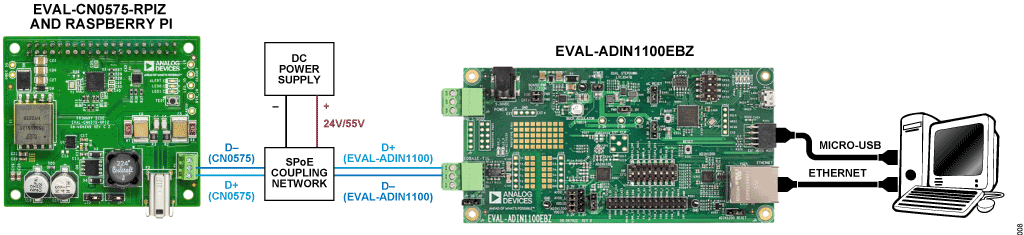
7. To indicate a successful link, the LINK LED on the EVAL-CN0575-RPIZ and the LED_0 LED on the EVAL-ADIN1100-EBZ must turn on and start blinking simultaneously.
8. On the host PC, use remote access software (PuTTY, VNC viewer) to log into and control the Raspberry Pi.
9. Open Python on the remote host and run the CN0575 example script, as shown in Figure 9. The CPU temperature and ADT75 will be displayed, the onboard ALERT LED will start blinking, and the state of the TEST button will be displayed.
